Stars: | Meaning: |
1 | Very dissatisfied |
2 | Dissatisfied |
3 | OK |
4 | Satisfied |
5 | Very satisfied |
Complete the job and approve the staffer’s worked hours.
Once approved, a pop-up screen will appear prompting you to rate the staffer.
Use the 5-star system to rate their performance:
5 Stars – Excellent
4 Stars – Satisfied
3 Stars – Decent
2 Stars – Not Satisfied
1 Star – Would not recommend
Optionally, leave a comment to provide feedback.
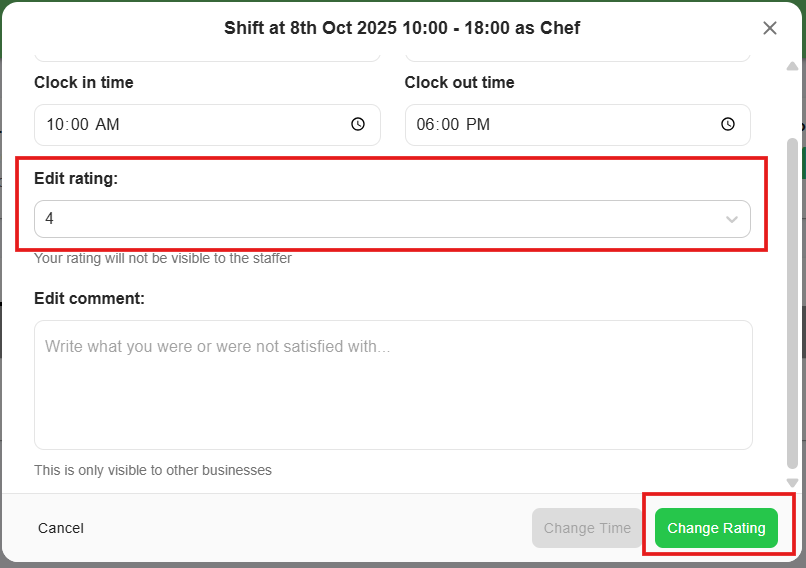
If you have forgotten to rate or you want to edit the staffer’s rating, you can always go back to “Job” and click “Shift”.
Select the shift and select the staffer you need to give a rating.
Click “Manage” - Scroll down to Ratings and select a rating for Staffer.
Save by clicking “Change Rating”

The rating system is a key part of the Staffers platform. By rating staffers:
You help ensure that shifts are performed professionally and successfully.
Future employers can see which staffers are reliable and skilled.
Staffers can improve and grow by understanding their strengths and areas for improvement.
Likewise, staffers also rate businesses to keep the process fair and transparent for everyone.
This system helps maintain high standards across the platform and benefits both staffers and employers.